A few years ago, a small business owner in Lahore designed a beautiful logo on her laptop. On the screen, it looked sharp and colorful. But when she printed it on a brochure, the image appeared blurry and dull. She was confused. The designer later explained the difference between DPI and PPI and everything made sense.
The difference between DPI and PPI is a common confusion for beginners and even professionals. While both terms relate to image quality, they serve different purposes. Understanding the difference between DPI and PPI helps avoid printing mistakes and improves digital design clarity. Whether you are a student, graphic designer, photographer, or printer, knowing the difference between DPI and PPI can save time, money, and effort.
Let’s explore this topic in detail.
Key Difference Between the Both
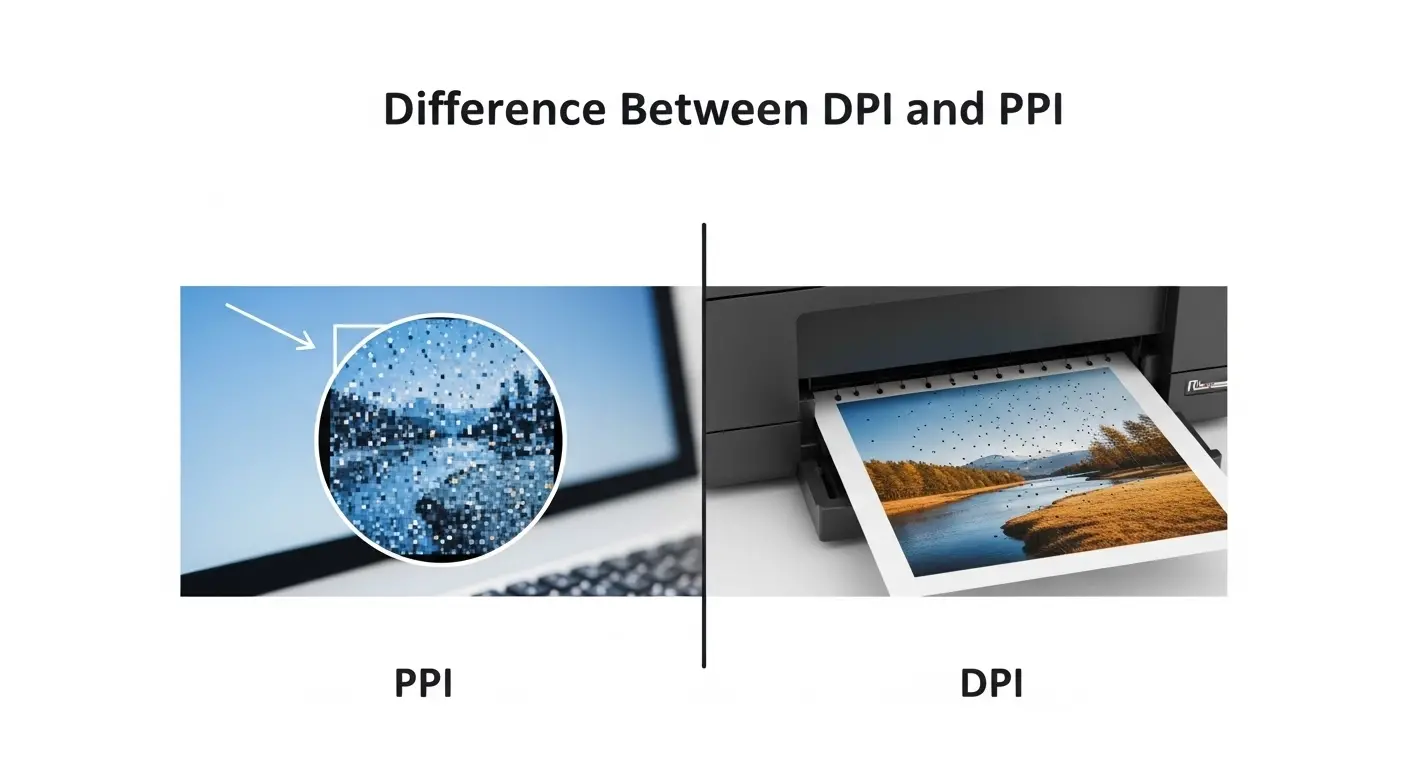
The main difference between DPI and PPI is simple:
- PPI (Pixels Per Inch) refers to the number of pixels displayed on a digital screen.
- DPI (Dots Per Inch) refers to the number of printed dots placed on paper by a printer.
PPI is for digital screens.
DPI is for physical printing.
Why Is Their Difference Necessary to Know?
Understanding the difference between DPI and PPI is important for both learners and experts. In today’s digital society, visuals play a major role in education, advertising, social media, and publishing.
- Students need it for presentations.
- Designers need it for logos and branding.
- Photographers need it for high-quality prints.
- Printing businesses rely on it for professional output.
Without knowing this difference, digital images may look perfect on screen but poor in print. This knowledge ensures accuracy, professionalism, and high visual standards.
Pronunciation
DPI
- US: /ˌdiː.piːˈaɪ/
- UK: /ˌdiː.piːˈaɪ/
PPI
- US: /ˌpiː.piːˈaɪ/
- UK: /ˌpiː.piːˈaɪ/
Before moving deeper, let’s break down the detailed difference between DPI and PPI point by point.
Difference Between DPI and PPI
1. Full Form
DPI = Dots Per Inch
Example 1: A printer may print at 300 DPI.
Example 2: High-quality magazines use 600 DPI printing.
PPI = Pixels Per Inch
Example 1: A phone screen may have 400 PPI.
Example 2: A computer monitor may have 110 PPI.
2. Usage Area
DPI is used in printing.
Example 1: Printing business cards.
Example 2: Printing posters.
PPI is used in digital screens.
Example 1: Designing websites.
Example 2: Editing digital photos.
3. Physical vs Digital
DPI deals with physical ink dots.
Example 1: Inkjet printer dots.
Example 2: Laser printer dots.
PPI deals with digital pixels.
Example 1: Laptop display.
Example 2: Smartphone screen.
4. Image Quality Impact
Higher DPI = Sharper printed image.
Example 1: 72 DPI looks blurry in print.
Example 2: 300 DPI looks professional.
Higher PPI = Sharper screen image.
Example 1: Low PPI screen looks grainy.
Example 2: High PPI looks crisp.
5. Measurement Nature
DPI measures ink dot density.
Example 1: Printing resolution setting.
Example 2: Scanner settings.
PPI measures pixel density.
Example 1: Display resolution.
Example 2: Image editing settings.
6. Controlled By
DPI is controlled by printers.
Example 1: Printer hardware capability.
Example 2: Print driver settings.
PPI is controlled by image resolution.
Example 1: Photoshop settings.
Example 2: Camera resolution.
7. Relevance to File Size
DPI affects printing output, not file size directly.
Example 1: Changing DPI in printer settings.
Example 2: Same file printed at different DPI.
PPI directly affects file size.
Example 1: High PPI image has larger size.
Example 2: Low PPI reduces file size.
8. Common Misuse
People often say “300 DPI image” for digital use.
Example 1: Web designers using wrong term.
Example 2: Students confusing both terms.
Correct term for digital images is PPI.
9. Hardware Dependency
DPI depends on printer technology.
Example 1: Inkjet printer 600 DPI.
Example 2: Professional printer 1200 DPI.
PPI depends on screen resolution.
Example 1: 1080p monitor.
Example 2: 4K display.
10. Output Result
DPI affects print sharpness.
Example 1: Brochures.
Example 2: Books.
PPI affects on-screen clarity.
Example 1: Mobile apps.
Example 2: Websites.
Nature and Behaviour of Both
DPI is physical and hardware-based. It behaves according to printing technology. More dots mean smoother gradients and better detail.
PPI is digital and software-based. It behaves according to screen technology and image resolution. More pixels mean better clarity.
Why Are People Confused?
- Both relate to resolution.
- Both use “per inch” measurement.
- Design software sometimes mixes the terms.
- Many tutorials use them interchangeably.
This overlap creates confusion in understanding the difference between DPI and PPI.
Table: Difference and Similarity Between DPI and PPI
| Feature | DPI | PPI | Similarity |
| Full Form | Dots Per Inch | Pixels Per Inch | Both measure resolution |
| Used For | Printing | Digital Screens | Both affect image quality |
| Nature | Physical | Digital | Both measured per inch |
| Controlled By | Printer | Screen/Image | Both impact clarity |
| Output | Printed Image | On-screen Image | Both improve sharpness |
Which Is Better in What Situation?
DPI is better for printing.
If you are printing brochures, banners, books, or business cards, high DPI ensures sharp results. Professional printing usually requires 300 DPI or more. Without proper DPI, printed images look blurry and unprofessional.
PPI is better for digital use.
For websites, social media graphics, mobile apps, and digital displays, PPI matters most. A high PPI screen delivers sharper visuals and a better viewing experience. For online content, focusing on PPI is essential.
How the Keywords Are Used in Metaphors and Similes
- “Her presentation was crystal clear.”
- “His explanation had low DPI and was full of gaps.”
- “Like high DPI printing, her work was detailed.”
- “The image was as sharp as a 4K PPI display.”
Connotative Meaning
DPI – Neutral (technical term)
Positive example: “High DPI printing shows professionalism.”
Negative example: “Low DPI ruined the banner.”
PPI – Neutral (technical term)
Positive example: “High PPI makes images vibrant.”
Negative example: “Low PPI screen feels outdated.”
Idioms or Proverbs Related to Clarity and Detail
- “The devil is in the details.”
Example: High DPI printing proves the devil is in the details. - “Picture perfect.”
Example: With high PPI, the image looked picture perfect. - “Crystal clear.”
Example: The screen was crystal clear due to high PPI.
Works in Literature Mentioning the Keywords
Direct literary works focusing specifically on DPI and PPI are rare because they are technical terms used mainly in digital media and printing studies.
However, they commonly appear in:
- Graphic Design Manuals (Technical genre, various authors, 2000s)
- Digital Photography Guides (Educational genre, 2010s)
Movies Related to Printing or Digital Imaging Themes
While no major films are specifically titled DPI or PPI, themes of digital imagery appear in:
- The Social Network (2010, USA) – Focus on digital platforms.
- Jobs (2013, USA) – Technology and screen innovation.
Five Frequently Asked Questions
1. Is DPI the same as PPI?
No. DPI is for printing, PPI is for digital screens.
2. What is best DPI for printing?
300 DPI is standard for high-quality printing.
3. Does PPI matter for websites?
Yes. Higher PPI improves screen clarity.
4. Can I use 72 DPI for print?
No, it usually produces blurry results.
5. Why do designers confuse DPI and PPI?
Because both measure resolution per inch.
How Both Are Useful for Surroundings
DPI helps produce quality printed materials like books, posters, and newspapers.
PPI improves digital experiences such as smartphones, televisions, and laptops.
Together, they enhance communication in both physical and digital environments.
Final Words for Both
DPI ensures print perfection.
PPI ensures digital clarity.
Both are essential in the modern visual world.
Conclusion
Understanding the difference between DPI and PPI is essential in today’s technology-driven society. While DPI focuses on printing resolution and physical output, PPI controls digital screen clarity. Confusing them can lead to poor print quality or misunderstanding in design work.
If you are a student, designer, photographer, or business owner, knowing when to use DPI and when to use PPI ensures professional results. Mastering the difference between DPI and PPI improves both your digital creations and printed materials, helping you communicate visually with clarity and precision.

I’m BeaconRise, the author behind GrammarCircle, where I help readers understand English grammar, language differences, and writing concepts in a simple and practical way. I specialize in explaining confusing words, grammar rules, and “difference between” topics so learners can easily improve their writing and communication skills.