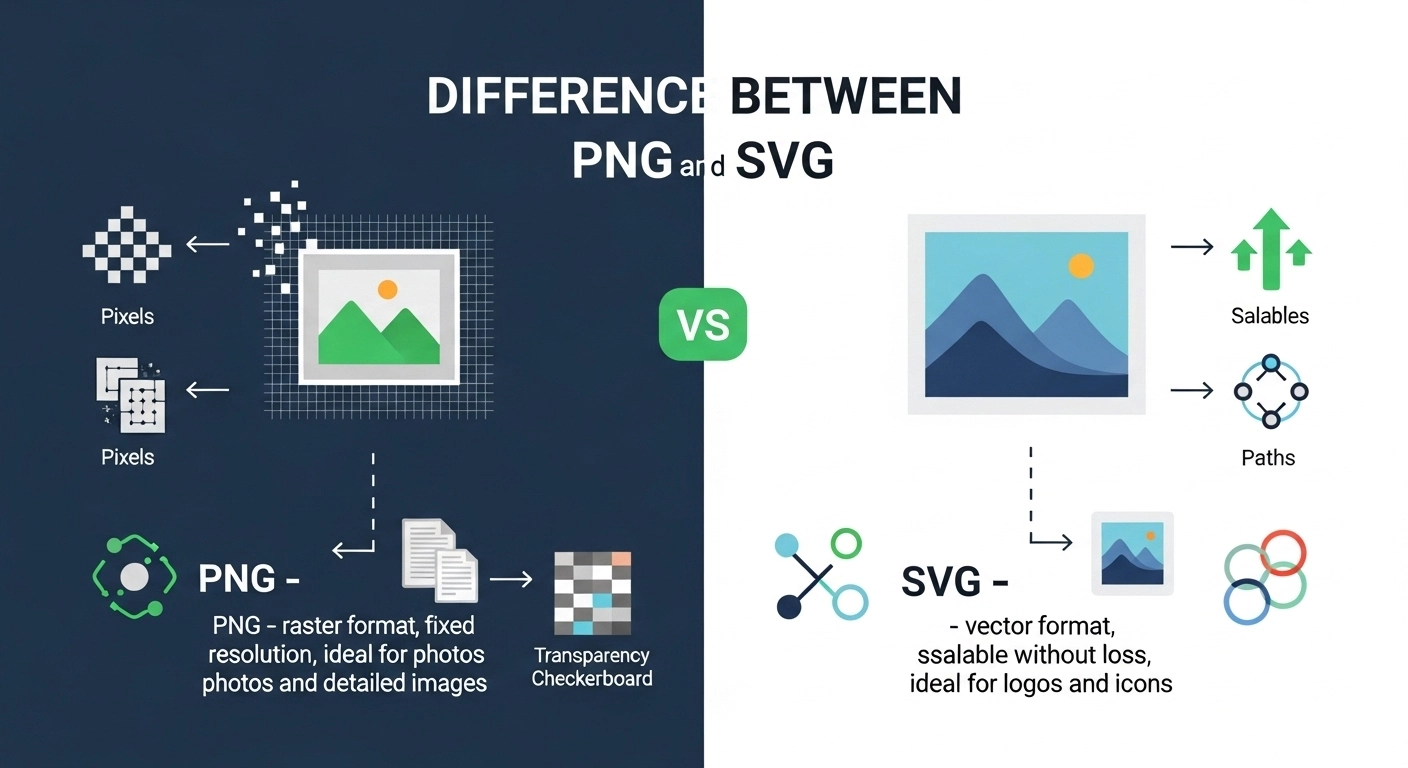
Have you ever wondered why some images on websites stay sharp even when zoomed in, while others become blurry? This is often the difference between PNG and SVG. PNG, short for Portable Network Graphics, is a raster image format widely used for web graphics, screenshots, and images with complex color details. On the other hand, SVG, or Scalable Vector Graphics, is a vector format that allows images to scale infinitely without losing quality.
Imagine a graphic designer preparing logos for multiple platforms. They often ask themselves, should I save this as a PNG or SVG? The choice affects website speed, print quality, and overall design adaptability. Understanding the difference between PNG and SVG is crucial not just for designers but for anyone working with digital visuals. Knowing this difference ensures images look professional and optimized across every medium.
Pronunciation:
- PNG – /ˌpiː.enˈdʒiː/ (US & UK)
- SVG – /ˌes.viːˈdʒiː/ (US & UK)
Linking Hook:
Now that we understand what PNG and SVG mean, let’s dive deeper into their differences and explore why each format has its unique strengths.
Difference Between PNG and SVG
Here are 10 key differences between PNG and SVG:
1. Format Type
- PNG: Raster image, made of pixels.
Example: A detailed photograph saved as PNG keeps all colors intact.
Example: A website screenshot stored as PNG preserves every small element. - SVG: Vector image, made of mathematical paths.
Example: A company logo as SVG can scale to a billboard without losing quality.
Example: Icons on websites are often SVG for sharpness at any size.
2. Scalability
- PNG: Loses quality when enlarged.
Example: Zooming a PNG logo for print may appear blurry.
Example: Enlarging a PNG icon for posters may pixelate it. - SVG: Infinitely scalable without quality loss.
Example: SVG illustrations remain sharp on any device.
Example: A vector map in SVG can be zoomed in repeatedly with no distortion.
3. File Size
- PNG: Large for high-resolution images.
Example: PNG photo of 1920×1080 can be 2–3 MB.
Example: A complex PNG icon may take 500 KB. - SVG: Generally smaller, especially for simple graphics.
Example: A vector logo SVG can be just 50 KB.
Example: An SVG icon pack for websites may total 200 KB.
4. Transparency
- PNG: Supports transparency and alpha channels.
Example: PNG icons on colored backgrounds show only the shape.
Example: PNG images with cutouts work well on websites. - SVG: Supports transparency inherently.
Example: SVG logo overlays any background without issues.
Example: SVG shapes can be filled or transparent dynamically.
5. Editability
- PNG: Harder to edit individual elements.
Example: Changing the color of a PNG logo requires Photoshop.
Example: Editing a PNG icon involves pixel manipulation. - SVG: Easily editable with code or vector software.
Example: SVG color changes via CSS.
Example: SVG elements can be animated in web development.
6. Animation
- PNG: Static, no built-in animation (unless converted to APNG).
Example: PNG logo cannot rotate on its own.
Example: PNG button hover effects require external code. - SVG: Can be animated using CSS or JavaScript.
Example: SVG loader icons rotate smoothly.
Example: SVG graphs can animate on web dashboards.
7. Browser Compatibility
- PNG: Supported universally.
Example: PNG works on all browsers.
Example: PNG email images appear consistently. - SVG: Mostly supported; some older browsers have limits.
Example: Modern browsers render SVG perfectly.
Example: Internet Explorer 8 may require fallback for SVG.
8. Printing
- PNG: Quality may degrade if enlarged.
Example: Printing a PNG poster can look pixelated.
Example: High-res PNG is needed for brochures. - SVG: Perfect for print at any size.
Example: Vector logos print sharp on business cards.
Example: SVG illustrations scale cleanly for billboards.
9. Complexity
- PNG: Better for detailed photos or gradients.
Example: PNG is ideal for complex web images.
Example: PNG captures subtle textures in photography. - SVG: Best for simple graphics or icons.
Example: SVG is perfect for minimalistic icons.
Example: SVG works well for geometric patterns.
10. Performance
- PNG: Larger size may slow web pages.
Example: Multiple PNGs can affect loading time.
Example: PNG-heavy galleries reduce site speed. - SVG: Lightweight and fast to render.
Example: SVG icons improve website performance.
Example: SVG reduces mobile data usage.
Nature and Behavior
- PNG: Static, pixel-based, best for photos. High-quality but heavier in size.
- SVG: Dynamic, vector-based, best for graphics and logos. Lightweight and scalable.
Why People Are Confused
People often confuse PNG and SVG because both are image formats used online. However, their core difference—raster vs. vector—is subtle to beginners. PNGs work best for photos; SVGs excel for illustrations and logos.
PNG vs SVG – Comparison Table
| Feature | PNG | SVG | Similarity |
| Format Type | Raster | Vector | Both are image formats |
| Scalability | Loses quality when enlarged | Infinitely scalable | Used in digital design |
| File Size | Larger for detailed images | Smaller for simple graphics | Both store visual information |
| Transparency | Yes | Yes | Support transparent backgrounds |
| Animation | No (except APNG) | Yes | Can appear on websites |
| Browser Support | Universal | Mostly supported | Rendered on modern devices |
| Printing | Quality may degrade | Perfect quality | Used in digital and print media |
| Editability | Harder to edit | Easily editable | Can be customized |
| Best Use | Photos, screenshots | Logos, icons, illustrations | Enhances visual content |
| Performance | Slower on web | Lightweight, fast | Both used online |
Which Is Better in What Situation?
PNG: Best for detailed images like photographs, screenshots, and textures. Websites with rich images benefit from PNG for high-quality visuals.
SVG: Best for logos, icons, and graphics that need to scale across devices. Web designers prefer SVG to maintain sharpness and reduce file sizes.
Metaphors and Similes
- PNG: “As detailed as a photograph” – shows richness in pixels.
- SVG: “Scales like a mountain” – infinite scalability without distortion.
Connotative Meaning
- PNG: Neutral, reliable, professional. Example: “A PNG image ensures clarity.”
- SVG: Positive, modern, adaptable. Example: “SVG logos make websites look sleek.”
Idioms/Proverbs Related
- “A picture is worth a thousand words” – applies to both PNG and SVG images.
Works in Literature
- None specifically use the exact format names; references appear in design and technology texts.
Movies on Keywords
- No movies directly titled PNG or SVG; these terms belong mainly to technology and design domains.
Frequently Asked Questions
- Can PNG be scaled without losing quality? – No, PNG is pixel-based.
- Is SVG better for logos? – Yes, because it scales infinitely.
- Do all browsers support SVG? – Modern browsers do; older ones may need fallback.
- Can PNG have transparency? – Yes, with alpha channels.
- Which is lighter for websites? – SVG is usually lighter for simple graphics.
How Both Are Useful for Surroundings
- PNG: Used in educational materials, advertisements, and websites for clear visuals.
- SVG: Used in icons, user interfaces, maps, and logos, contributing to scalable, lightweight digital content.
Final Words
Understanding the difference between PNG and SVG helps designers, marketers, and web developers make the right choice. Both formats serve different purposes but complement each other in digital design.
Conclusion
Choosing between PNG and SVG comes down to the nature of the project. PNG is ideal for detailed, static images, while SVG excels in scalability and lightweight graphics. Knowing the difference helps optimize performance, maintain visual quality, and ensures designs look professional across all media.
Awareness of these formats empowers creators to deliver crisp, adaptable visuals in both print and digital platforms.

I’m BeaconRise, the author behind GrammarCircle, where I help readers understand English grammar, language differences, and writing concepts in a simple and practical way. I specialize in explaining confusing words, grammar rules, and “difference between” topics so learners can easily improve their writing and communication skills.